Drawing Your Way to a Better API: REST Flows in DrawIt
Before you write a single endpoint, draw the flow. This walkthrough shows how to design REST APIs visually using DrawIt sequence diagrams.
By Calvin Magezi
Most API design problems are not implementation problems. They are design problems that were never visible because the design happened entirely in someone's head, then appeared in code.
Drawing an API before you build it takes twenty minutes. Debugging a badly designed API after it is in production takes weeks. The math is obvious.
Why diagrams catch API mistakes early
When you write an API spec or jump straight to code, you are working linearly. Endpoint by endpoint. Request by response. The relationships between endpoints are implicit. The sequence of calls a client needs to make is assumed.
A sequence diagram makes all of that explicit. You draw the client, the server, and any third-party services. You draw the arrows. You label them with the HTTP method and the resource path. Instantly, three types of problem become visible:
Unnecessary roundtrips. If a client needs to make three requests to render one screen, you see that in the diagram. Maybe those three endpoints should be one.
Coupling that should not exist. If your mobile client calls your analytics service directly, the diagram shows it. That is a problem waiting to happen.
Missing error paths. When you draw the happy path, you can see where errors are possible. The diagram asks: what happens here if the payment fails? If the diagram does not have an answer, neither does your API.
A worked example: user authentication flow
Here is how to draw a standard authentication flow before writing any code.
Start with three columns: Client, Auth Service, User Service. Then draw the sequence:
- Client sends
POST /auth/loginwith email and password to Auth Service. - Auth Service calls User Service
GET /users?email=to retrieve the user record. - User Service returns the user object or a 404.
- Auth Service validates the password hash.
- On success, Auth Service returns a signed JWT to the Client.
- On failure, Auth Service returns
401 Unauthorized.
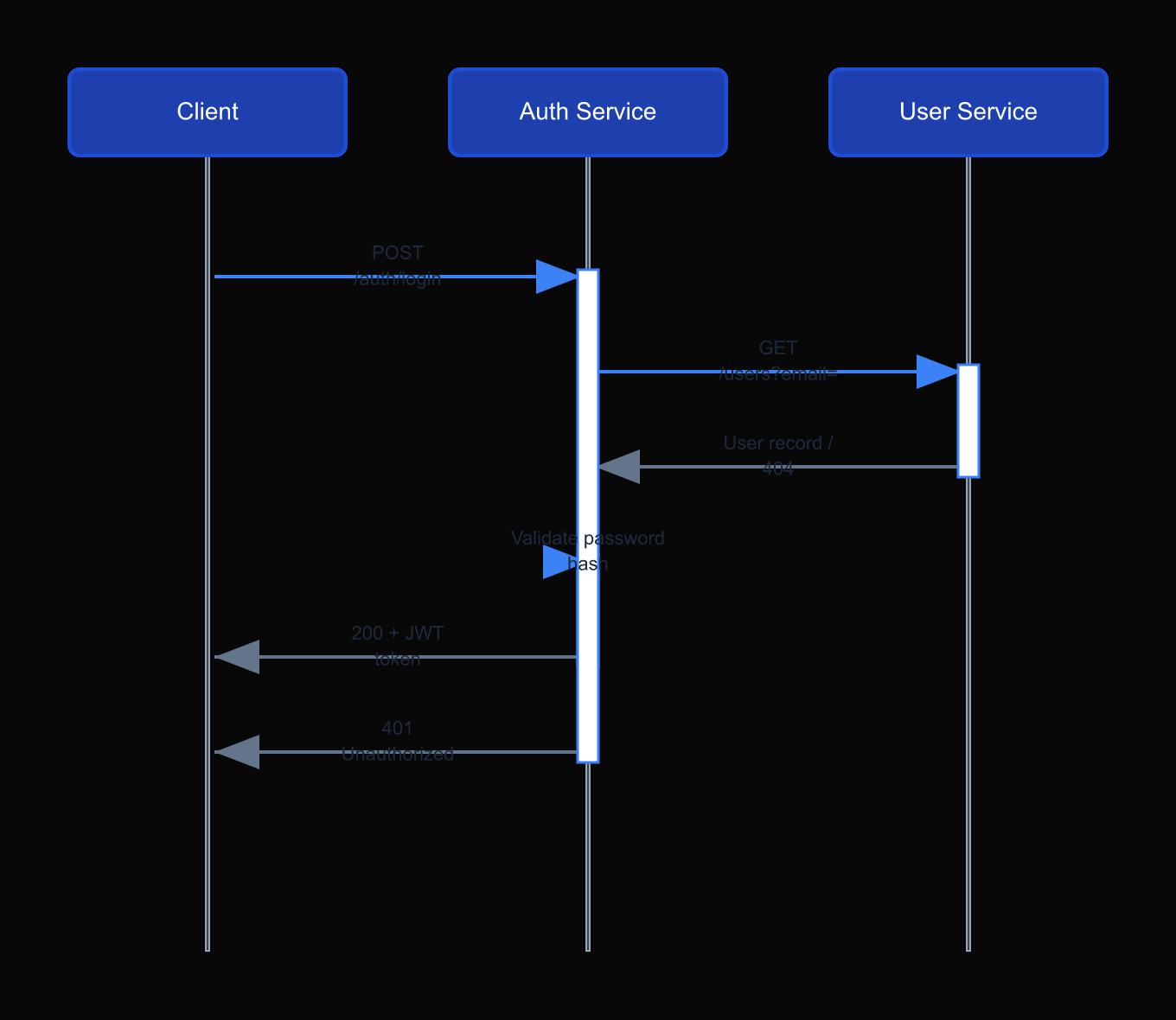
Drawing this takes about five minutes. But look at what the diagram reveals immediately:
The Auth Service is calling the User Service synchronously on every login. For high-traffic applications, that is a latency problem. The diagram makes you ask: should Auth Service cache user records? Should it call User Service asynchronously? These are architecture questions you want to answer before writing code.
The resource map: what diagrams reveal about your data model
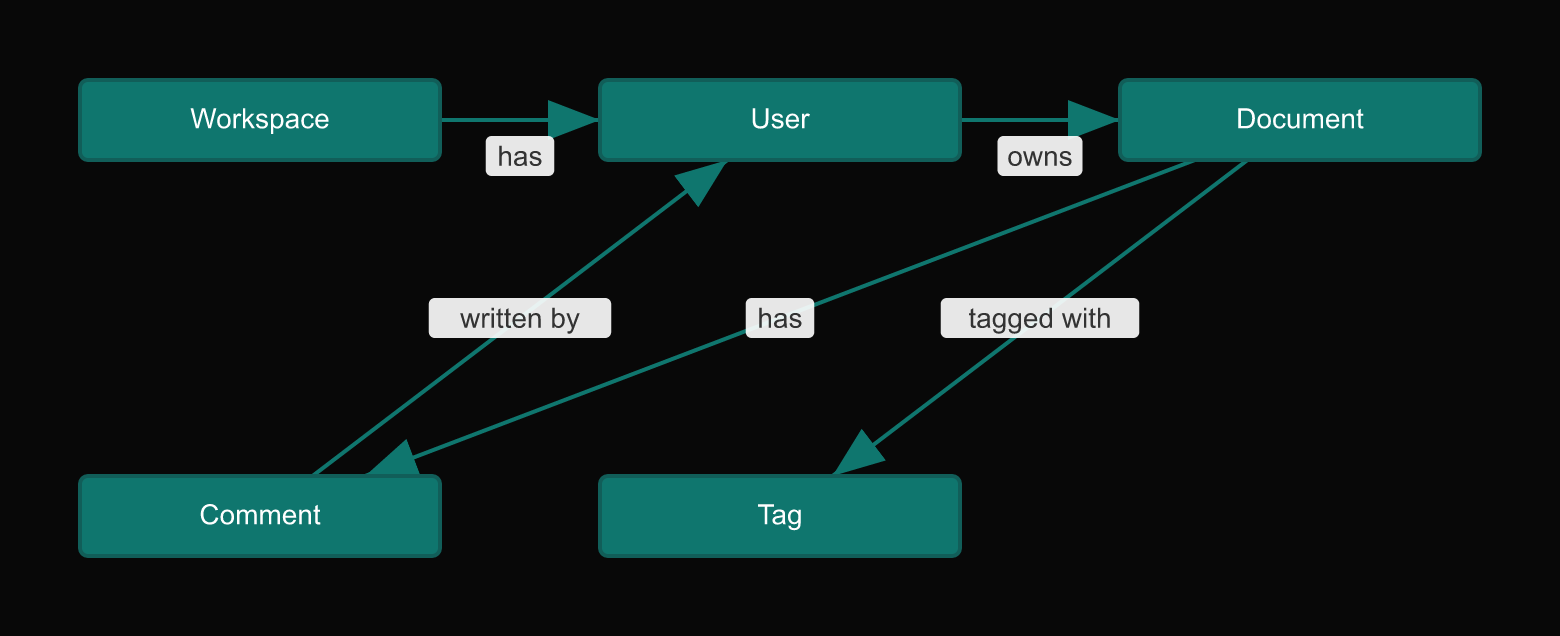
Sequence diagrams show flow. But there is a second type of diagram that is just as useful for API design: the resource map.
A resource map shows your API resources as nodes and the relationships between them as edges. A User has many Documents. A Document has many Comments. A Comment belongs to a User.
When you draw this, two things become obvious. First, you can see whether your resource hierarchy reflects your domain or your database schema. Those are not the same thing, and confusing them produces APIs that are hard to use.
Second, you can see where nested routes make sense and where they do not. /users/:id/documents makes sense because documents belong to a user. /documents/:id/comments/:id/reactions is probably too deep.
Using DrawIt for API design
To draw these diagrams in DrawIt, describe what you are building and let the AI generate a starting point. For a sequence diagram:
"Create a sequence diagram for a REST API authentication flow with a mobile client, an auth service that issues JWTs, and a user service that stores accounts."
DrawIt generates the diagram. You edit it: add error paths, rename services, adjust the sequence. Export it as SVG and include it in your API spec document.
The diagram lives alongside the spec. When the API changes, you update the diagram. The diagram becomes the living documentation that prose spec documents rarely manage to be.
Catching the versioning problem early
There is a third class of API design problem that diagrams catch reliably: versioning assumptions baked into the design before anyone thought about versioning.
Most APIs start without a versioning strategy. The first clients are internal. The first endpoints feel permanent. Then the API grows, external clients appear, and making a breaking change becomes a coordination nightmare.
When you draw the API flow before building it, versioning questions surface naturally. The diagram shows which clients call which endpoints. You can see immediately whether changing an endpoint signature would break one client or ten. You can draw the v1 and v2 flows side by side and decide upfront whether to version by URL, header, or content negotiation.
These are decisions that are cheap to make at design time and expensive to retrofit. The diagram does not make the decision for you. It makes the decision visible at the right moment.
In DrawIt, you can maintain two versions of the same API diagram on the same canvas, annotated with which endpoints changed. The diff is visual. When the time comes to sunset v1, you can see exactly which clients are still pointing at the deprecated endpoints. That is documentation that updates alongside the system.
The discipline
The rule is simple: no new API endpoint without a diagram of when and why a client needs to call it. If you cannot draw the sequence, the endpoint is not ready to be built.
This sounds like overhead. In practice, it takes five to ten minutes and prevents hours of rework.